A Debug-First JS Playground and CSS Playground
This page is your working bench for front-end troubleshooting. Use it as a js playground to reproduce interaction bugs in a real browser runtime, and as a css playground to isolate layout and selector issues quickly. Instead of rerunning a full app for every small change, you can paste a failing snippet, validate behavior, and iterate with focused tools: bidirectional mapping and highlight between CSS, JavaScript, and the preview (click preview or code to jump), JS/CSS format actions, and a code cache that preserves your workspace for future sessions. The explanation panel helps you interpret selected code while debugging, so it also works as a practical learning surface for juniors and cross-functional teammates.
Style & script debugging
Browser JavaScript tester
Resume from saved cache
Use one workspace from reproduction to fix
The homepage introduces the product. This page is for execution. It is designed for developers who already know the problem they need to solve: a broken interaction, a stubborn CSS rule, or a snippet that behaves differently in browser context. The content and structure here are intentionally task-oriented so you can move from issue report to verified fix with fewer context switches.
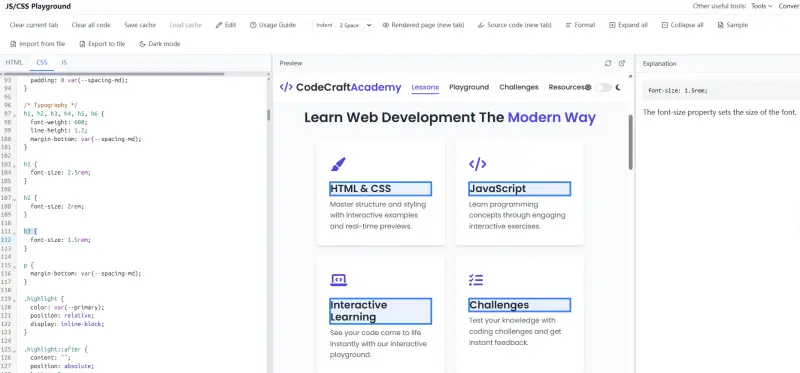
Reproduce, inspect, refine, and save your debugging context
In JavaScript mode, you can validate click handlers, event delegation, DOM updates, and conditional rendering logic exactly where those issues surface: in a browser environment. That makes this page a reliable javascript tester and javascript code runner for UI behavior work.
In CSS mode, bidirectional highlight helps you confirm style ownership quickly. In JavaScript mode, preview and code stay linked so you can compare events and DOM logic against what you see. Formatter actions keep long blocks readable. When you need to pause, save code cache and reload the same workspace without rebuilding the snippet from scratch.
Back to topPersistent code cache
Save your current HTML/CSS/JS and reload it later to continue debugging without losing context.
CSS/JS formatting tools
Normalize messy snippets quickly so selector relationships and logic blocks are easier to review.
Explanation panel support
Inspect selected code with concise explanations to speed up reviews and onboarding.
Feature set for real bug workflows in JS and CSS
The goal is practical throughput: reproduce faster, isolate root cause, apply fix, and keep a reusable debug workspace.
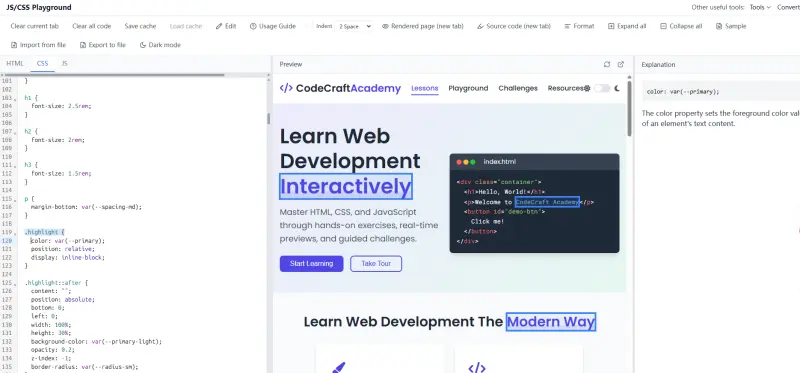
CSS ownership tracing when styles conflict
Use CSS ↔ preview bidirectional highlight to see which rule block controls a target element. JavaScript also links to the preview so you can align scripts with UI behavior—especially helpful for cascade conflicts, nested selectors, overrides, and regressions.
- Browser JavaScript tester for UI bug reproduction
- CSS/JS ↔ preview bidirectional highlight for clearer attribution
- Format + explain workflow for review clarity
- Save and reload code cache between sessions
Suggested workflow: from bug ticket to validated fix
Regression triage
Recreate broken UI behavior from a ticket and validate a fix path quickly.
Patch verification
Test CSS and JS patch candidates before touching production files.
Async review handoff
Share formatted snippets and explanation-backed reasoning with reviewers.
What users say
Short notes from common use cases: debugging, cleanup, and teaching.
I use it when a snippet looks wrong in production. Seeing source and preview together cuts my debugging time a lot.
Alex M.
Front-end developer
"Our team uses it to clean generated HTML before committing. The formatted output is easier to review."
Jordan K.
Student / Using tool for 4 months
"I teach juniors with it because they can see markup changes reflected immediately in preview."
Sam T.
Designer / Using tool for 2 months
"Import, adjust, preview, export. The flow is simple and avoids opening three different tools."
Riley C.
Beginner / Using tool for 3 months
FAQ
Open the JS Playground & CSS Playground Workspace
Run browser JavaScript, trace causes with CSS/JS ↔ preview bidirectional highlight, format code, and continue later with saved cache.
JS/CSS Playground Online
- JavaScript sandbox for browser interaction debugging
- CSS/JS ↔ preview bidirectional highlight & ownership tracing
- CSS/JS formatting for cleaner investigations
- Code cache to resume work in your next session